
Secure Desktop 13 Shell
Secure Desktop 13. The Best Version Yet.
Secure Desktop 13. Point of Sale, Cafe, Factory Automation, Lab, Kiosk, Hotel, Restaurant, or Library -- whatever your public environment, Secure Desktop will lock down Windows. Replace the start menu, taskbar, and desktop icons with the Secure Desktop shell to control what a user can or can not do.
Icon Wizard. Window Wizard. Icon Passwords. User Auditing. Tab Passwords. Disable Menus. Secure Desktop 13 provides the security tools you need—Disable over 400 keyboard shortcuts for any program. Secure Desktop is ideal for a computer running in a public area.
Secure Desktop is the perfect endpoint security solution for a public internet kiosk. Get Secure Desktop 13 today.
Endpoint Security for Windows Since 1994
In 1994, Visual Automation created a simple shell program to replace Program Manager in Windows 3.1. Since then, Secure Desktop has secured nearly every commercial version of Microsoft Windows. For Windows 11, we started with the features that customers need.
New features are everywhere. While working on the user interface, nearly every element of Secure Desktop was studied and improved for touchscreen ease of use. You can disable over 400 keyboard shortcuts. Application launching. Window Wizard. Secure Desktop 13 is easy to use and a more powerful endpoint security solution at the same time.
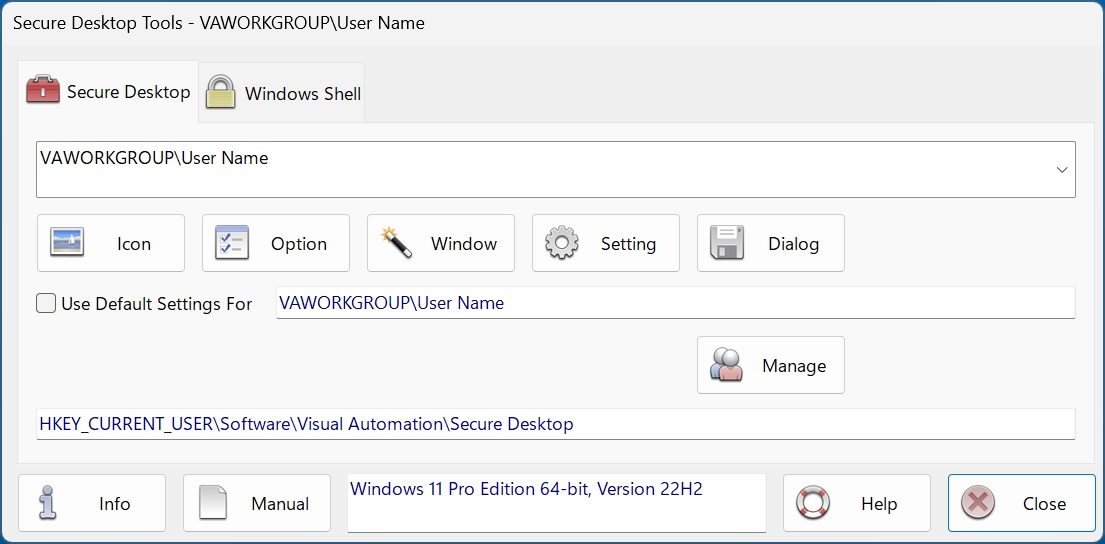
Secure Desktop Tools
Our online store, Shopify, offers convenient online ordering 24 hours a day, every day.
Secure Utilities 13 Data Sheet
Secure Utilities 12 Data Sheet
Secure Utilities 11 Data Sheet
Configuration
Configuration Now In Registry
All configuration data is in the Registry; use Secure Desktop Tools to set configuration.
User Auditing
CSV Files and Windows Event Log
Audit files are now in CSV format. Optionally save audit data to the Windows Event Log. Save in both places for redundancy!
Documentation
Help. Adobe PDF.
Secure Desktop 13 has in-dialog help and tooltips throughout the impressive user interface. We have rewritten the Adobe PDF manual.
Keyboard
Over 400 Hot-Keys Disabled
Secure Desktop 13 has over 400 keyboard shortcuts to disable in Windows 11. These are system-wide for any program. Take Control.
Windows 11
UAC Ready
Secure Desktop 13 works with Windows's User Access Control (UAC). Run programs as Administrator. Single instance only. Re-start if closed.
Utility
sAudit. sWall
View Audit CSV files. View Wallpaper graphics. Utility applications found in Secure Desktop 10 and earlier are now part of Secure Utilities 13.
Secure Utilities 13
Included with Secure Desktop 13
sExplore File Explorer. sCopy File. sMenu Start Menu. sArchive File. sNote Viewer. sImage Viewer. sCSV Viewer. sZIP Viewer. sKey On-Screen Keyboard. sRun Program. sControl Panel. sEject Device. sRes Resolution. sLock Workstation. Logon, Drive Hiding, Touch/Pen Disable, and Auto Logoff registry settings.
Secure Desktop 13 Arm64
Compiled for Windows 11 Arm64
Same Source. Same Features. Different Part Numbers. Includes Secure Utilities 13 Arm64.
Industries Served
Factory Automation (HMI)
We designed Secure Desktop for control engineers using a Windows computer on the factory floor. Human-machine interface (HMI), data collection, report generation, and soft control applications are mission-critical. Therefore, we need the security features found in Secure Desktop.
21 CFR Part 11 (FDA)
Secure Desktop has several features to aid the pharmaceutical, biotechnology, food, and beverage industries. You can control access to application files and data files. You can log user activity and automatically log users off from Windows due to inactivity.
Retail Point Of Sale (POS)
We designed Secure Desktop for IT professionals using Windows in the restaurant, retail, lodging, and resort industries. Point of sale (POS), inventory, customer-activated terminals, drive-thru, and kitchen order fulfillment are mission-critical and need the security features found in Secure Desktop.
Kiosks
We designed Secure Desktop for IT professionals installing a Windows computer in a library, museum, cafe, airport, or college. Browsing the internet, navigating an intranet, or using a custom multimedia database on a public kiosk computer requires the security features found in Secure Desktop.
The Browser Is The Desktop
Secure Desktop 13 is the best way to create a browser-based desktop system for factory automation, retail point-of-sale, hospitality kiosks, libraries, museums, schools, labs, and cafes. Secure Desktop 13 provides the right solution anywhere a browser-based desktop is needed.